
Tasks to complete in advance
You must complete the following checks before the FSAC begins:
Required documents
Proof of identity
You must provide your passport details as proof of your identity before the FSAC.
How to send your passport details
A test administrator will email you around 3.30pm on the last working day before the FSAC to request a copy of your passport.
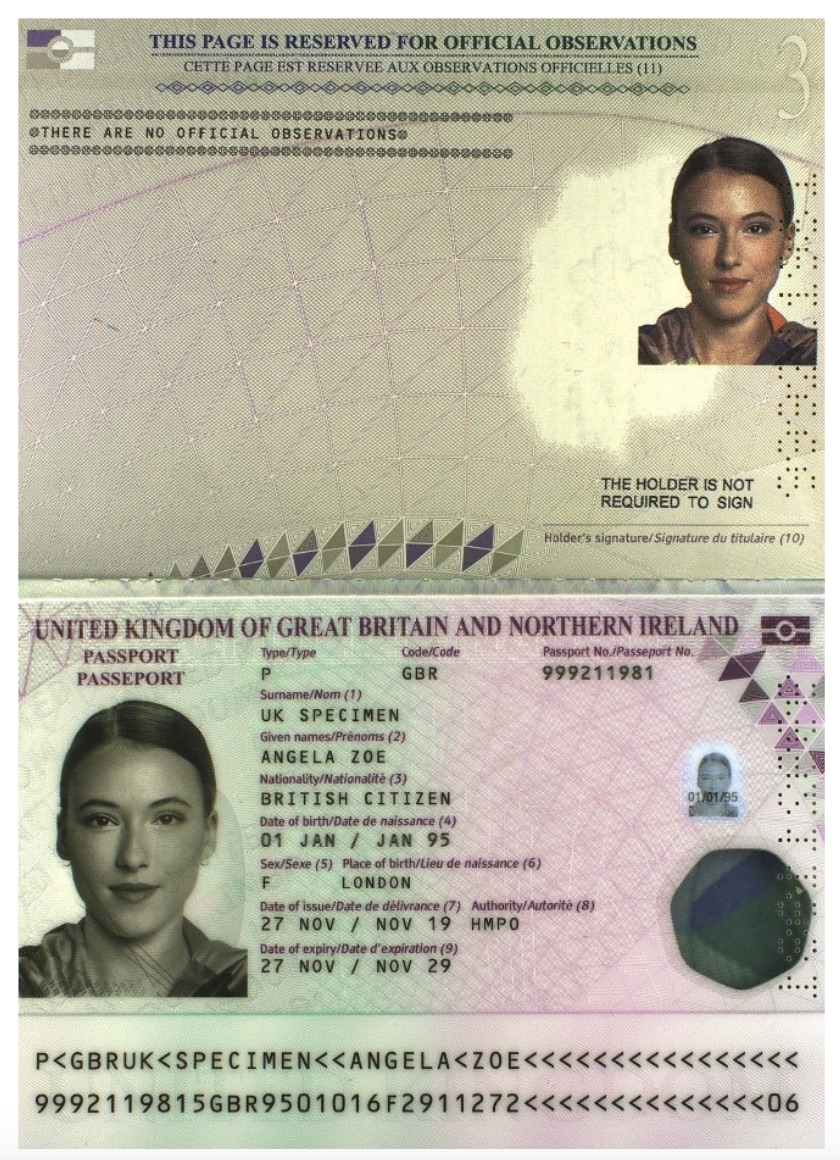
Please email them a double-page scan or photo of your passport details page. It must clearly show:
- your photo page
- the official observations page
If you do not have a valid passport
Please provide an alternative form of photo ID, preferably a valid driving licence.
If you cannot provide any form of photo ID, please provide an electronic copy of your birth certificate and a headshot photo. You can take this headshot photo on your laptop, phone or other electronic device.
Optional document: Degree certificate
If you have your Degree Certificate, please email a copy to us along with your ID documents.
IFor do not have your certificate yet, don’t worry – we will ask to see it at a later date.
Important: If you are offered a place on the Fast Stream, you must bring your original certificate on your first day of employment. If you cannot provide it, we may have to withdraw our offer.
IT checks
To help your online assessment run smoothly, prepare your setup in advance.
- Browser: We will use Google Meet. To ensure compatibility, please use the latest version of Google Chrome, Mozilla Firefox, Microsoft Edge or Apple Safari. Internet Explorer is not compatible.
- Equipment: Check your microphone and camera work.
- Space: Find a quiet room with a reliable internet connection and a charging socket. Use 2 screens if you need to.
- Connectivity: Have your mobile phone nearby in case we need to contact you about connectivity issues.
Need help with your assessment?
If you have any questions about the FSAC or need support with your set-up, please submit a request for help.
Our team is here to help you throughout the process.
Read the briefing email
You will receive a briefing email from your test administrator at around 3.30pm on the last working day before your event.
This includes:
- your test administrator’s contact details
- instructions for sending your photo ID
- the link to your virtual meeting room
If you have not received this by 4pm, check your junk or spam folder. If it’s not there, submit a request for help.
Reasonable adjustments
If you need reasonable adjustments and have already shared this with us, we will have these in place for your assessment.
Adjustments must be agreed in advance of any assessments and cannot be granted on the day.
If you need to request reasonable adjustments, submit a request for help as soon as possible.
Reasonable adjustments at the Final Selection Board
These may vary depending on the scheme. Please submit a request for help as soon as possible.